SJinn vs Supreme AI Writer
Side-by-side comparison — pricing, features, ratings, use cases. Find which AI Writing Tools fits you best.
💰 Pricing
🔧 Features
📋 Assessment
💪 Strengths
- SJinn's Starter plan at $29/month includes SEO tools and brand voice customization, a rare value at this price point. The built-in content briefs generate keyword lists and outline suggestions, streamlining the optimization process. For small businesses, this eliminates the need for separate SEO subscription, which can easily cost $50 or more per month. The free tier is also generous, allowing users to test with a limited word count before committing.
- The integrated SEO scoring and real-time readability feedback are genuinely useful. As you write, SJinn analyzes keyword usage and suggests improvements, helping you craft articles that are more likely to rank. The content brief feature goes a step further, automatically pulling topic data and offering an outline, which is a huge time-saver for writers who normally have to research and plan manually.
- The multi-language support in the Pro plan is a standout for global teams. Users can generate content in 25+ languages, making it easy to adapt blog posts or social media campaigns for international audiences. This feature is not always present in competing tools at this price, giving SJinn an edge for businesses with multilingual needs.
- The user interface is clean and intuitive. Navigating between content generation, editing, and management is straightforward, even for beginners. The dashboard provides a clear overview of all projects, and the editor offers a distraction-free writing mode. This reduces the learning curve and helps teams get productive quickly.
- The management aspect is well-designed. SJinn allows you to organize content into projects, assign tags, and track status, which is helpful for teams managing multiple pieces. The ability to clone and repurpose content is a nice touch, saving time when creating variations for different platforms.
⚠ Watch out for
- A major drawback is the absence of a built-in plagiarism checker. In an era where AI-generated content is scrutinized for originality, this is a significant omission. Users must rely on third-party tools like Grammarly or Turnitin, adding both cost and workflow friction. The platform also lacks grammar and style suggestions, which are standard in many competitors like Writesonic and Copy.ai.
- The word limits on lower tiers are restrictive. The Starter plan caps at 50,000 words per month, which can be consumed quickly by content-heavy teams or agencies. Upgrading to Pro is necessary for more capacity, but that doubles the price to $59/month. For users who only need occasional content, this may be overkill, leaving a gap in the middle.
- There's no mobile app or browser extension, which limits on-the-go content creation. In a world where many writers and marketers use mobile devices or browser-based tools as part of their workflow, this is a notable gap. You'll be tethered to the web dashboard, which can be inconvenient for capturing ideas on the fly or editing while traveling.
- The free tier's word limit is quite low, at just 1,000 words. This is enough to test the interface but insufficient for any real content creation. Users will quickly hit the wall and need to upgrade, which might feel like a bait-and-switch for those who expect a more generous trial.
- Customer support is limited to email and chat, with no phone support or live chat on weekends. Response times can be slow, sometimes taking up to 24 hours for a reply. This can be frustrating when you're facing a technical issue or need urgent help with a deadline.
🎯 Best for
Content marketers, small business owners, and freelance writers who need affordable AI writing with SEO features and multi-language support.
🚫 Who should skip
Users who require advanced grammar checking, plagiarism detection, or image generation within the platform.
📚 Learning curve
Minimal – intuitive interface with templates and guided content briefs, easy to start generating content quickly.
🧑⚖️ Verdict
SJinn is a solid choice for budget-conscious content creators and small businesses that need AI writing with built-in SEO tools. Its affordable pricing and integrated features make it a strong value, but the lack of a plagiarism checker and mobile app may be dealbreakers for some. If you prioritize
💰 Pricing
🔧 Features
📋 Assessment
💪 Strengths
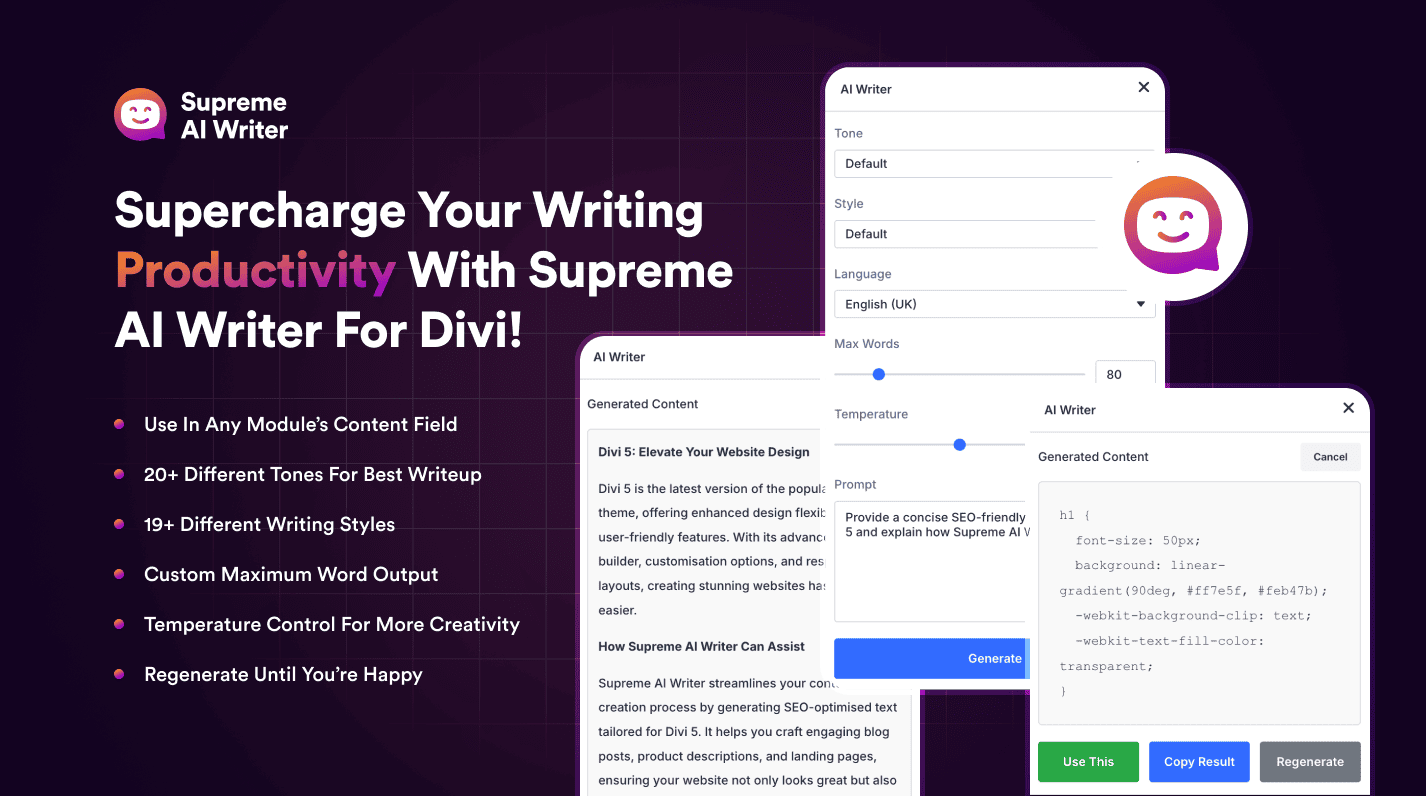
- Seamless Divi Builder Integration: Supreme AI Writer lives directly inside the Divi Builder, so you can generate content, images, and code without switching tabs or copying text between systems. This integration is the plugin's biggest selling point—it shaves minutes off each task and keeps your workflow fluid, especially when you're building multiple pages.
- Unlimited Word Generation: At $49/mo, the plan includes unlimited word generation, which is rare among AI writing tools that typically cap usage. For content-heavy Divi sites or agencies handling multiple clients, this means predictable costs and no throttling, making it a solid value if you produce a lot of copy.
- Built-in SEO Optimization: The plugin includes an SEO scoring system that analyzes your content for keyword usage, readability, and other factors. It also generates meta descriptions and titles, integrating with the Divi theme's SEO features. This ensures that your content isn't just well-written but also primed for search engines, which is crucial for attracting organic traffic.
- Long-Form Editor: Unlike many AI tools that struggle with long content, Supreme AI Writer offers a dedicated long-form editor that lets you expand on initial drafts, maintain a consistent voice, and organize sections. This is particularly useful for blog posts and articles, where coherence and depth matter.
⚠ Watch out for
- Exclusive to Divi and WordPress: The biggest limitation is its narrow compatibility. If you don't use Divi or WordPress, you're locked out. Even within WordPress, users of Elementor or Gutenberg won't find this useful, severely limiting its market. For non-Divi users, this plugin is irrelevant.
- No Plagiarism Checker or Grammar Support: Supreme AI Writer lacks built-in tools to check for plagiarism or grammar errors, which are standard in many AI writing platforms. This means you'll likely need to invest in additional tools like Grammarly or Copyscape to ensure content originality and correctness, adding cost and friction to your workflow.
- No Free Trial or Tier: There's no free trial or free plan, so you must commit $49 upfront without testing the plugin. While the price is reasonable, the lack of a trial creates a risk for potential buyers who might not find the integration as smooth as expected. This could be a dealbreaker for those who prefer to validate before purchase.
🎯 Best for
Divi users who want an all-in-one AI writing, image, and code generator integrated directly into their page builder workflow.
🚫 Who should skip
Non-Divi WordPress users, freelancers needing a standalone AI writer, or teams requiring collaboration and plagiarism checks.
📚 Learning curve
Minimal – if you already use Divi, the AI writer fits naturally; new Divi users will need basic builder familiarity.
🧑⚖️ Verdict
Supreme AI Writer is a powerful tool for Divi users who want to streamline content creation within the builder, offering great value with unlimited words and SEO tools. However, its exclusivity to Divi/WordPress and lack of trial, plagiarism checking, and grammar support make it a niche choice. If y
📊 Use Case Suitability
Higher score = better fit. Scores from editorial review.
🧭 Which One Should You Pick?
Choose SJinn if...
- You are: Content marketers, small business owners, and freelance writers who need affordable AI writing with SEO features and mul
- 👍 Affordable entry price with a free tier and $29/month Starter plan that includes SEO tools and brand
- 👍 Integrated SEO features and content briefs help streamline optimization without needing separate too
- 👍 Multi-language support (Pro plan) allows content creation in various languages, beneficial for globa
- 💰 From $29/mo
- ⚠ Trade-off: Lacks built-in plagiarism checker, grammar/style suggestions, and readability sc
Choose Supreme AI Writer if...
- You are: Divi users who want an all-in-one AI writing, image, and code generator integrated directly into their page builder work
- 👍 Seamless integration with the Divi Builder, eliminating the need to switch between tools.
- 👍 Unlimited word generation at a flat $49 price, with no usage caps.
- 👍 Built-in SEO optimization and long-form editor for polished, search-friendly content.
- 💰 From $49/mo
- ⚠ Trade-off: Exclusive to Divi and WordPress – useless for non-Divi users or other content ma
❓ Frequently Asked Questions
Does SJinn have a free plan and what are its limitations?
Yes, there is a free plan with limited word count (exact limit not specified). It includes AI content generation and templates, but lacks SEO integration, brand voice, and analytics. For full features, you need the Starter plan at $29/month.
Can SJinn generate content in multiple languages?
Yes, the Pro plan supports multiple languages. The free and Starter plans may have language limitations; check the website for specifics.
Does SJinn include a plagiarism checker or grammar tool?
No, SJinn does not offer a built-in plagiarism checker or grammar/style suggestions. You would need to use third-party tools for those tasks.
What happens if I exceed my word limit on a paid plan?
The pricing page does not specify overage fees. Likely you can top up or upgrade to the next tier (Pro at $79/month for 200k words). Contact support for custom options.
🔗 More AI Writing Tools Comparisons
🔀 Explore Alternatives
📧 Save this comparison
We'll email you a link to this comparison. No spam.