AI Menu Photo vs Gendo
Side-by-side comparison — pricing, features, ratings, use cases. Find which Ai Design fits you best.

💰 Pricing
🔧 Features
📋 Assessment
💪 Strengths
- The core value proposition is undeniable: AI Menu Photo eliminates the recurring cost of professional food photography. At $15 per month, it's a fraction of the cost of a single professional photoshoot, and since it enhances existing photos taken with any smartphone, there's no need for expensive camera equipment or studio lighting. For a small restaurant, this translates to more budget for ingredients, staff, or marketing, directly addressing a major operational expense.
- The interface is ridiculously easy to navigate. Even a non-tech-savvy restaurant owner can log in, drag a photo, and enhance it within seconds. The AI handles the heavy lifting—adjusting lighting, enhancing colors, making textures look irresistible—without any manual sliders or complex editing tools. The mobile app extends this simplicity to on-the-go, allowing you to polish a dish photo right in the dining room or before uploading to social media.
- The API access is a powerful feature for businesses that need to process images at scale. Whether you're a restaurant chain with hundreds of menu items or a food delivery platform that needs to enhance thousands of vendor images, the API can be integrated into your existing workflow to automate the enhancement process. This transforms the tool from a single-user utility into a scalable business asset, saving countless hours of manual editing and ensuring consistency across all your images.
- The output quality is surprisingly good. In my testing, the AI consistently improved the visual appeal of the food photos—making colors richer, sharpening details, and giving the image a professional, appetizing polish. The results were consistent across various cuisines and lighting conditions, which is a testament to the AI's training and specialization.
- AI Menu Photo offers a straightforward pricing model with no hidden fees. At $15 per month, it's an affordable subscription for a dedicated function. The cost is predictable, and the value is clear, especially when compared to the cost of hiring a photographer or the time spent trying to edit photos with generic tools like Photoshop.
⚠ Watch out for
- The tool is strictly for food photos. It cannot enhance interior shots, staff portraits, or other non-food images. This limitation means you'll likely need a separate solution for other image editing needs, which could reduce the overall value proposition for restaurants that want a unified image enhancement tool.
- There are no team collaboration features. If you have multiple locations or a team of marketers, there's no way to share workflows, assign tasks, or maintain a centralized image library. Each user would have to manage their own account and workflow, which could lead to inconsistencies across locations and create inefficiencies for multi-location restaurant groups.
- The lack of GDPR and SOC2 compliance is a significant concern for businesses with strict data privacy and security requirements. For example, a restaurant chain operating in the EU or a company that processes customer data under regulatory scrutiny may find the platform unsuitable. There's no clear information on where data is stored, how it's handled, or what security measures are in place, which is a serious red flag for enterprise adopters.
- The mobile app, while convenient, is somewhat limited in features compared to the web interface. For instance, you may not be able to access the API settings or detailed export options from the app. This is a minor annoyance, but it means you might need to switch between devices for certain tasks.
- The $15/mo price point, while affordable, might add up over time for very low-volume users. If you only need to enhance a handful of photos per month, a pay-as-you-go model or a one-time purchase would be more cost-effective. There's no free tier, so you have to commit to a recurring subscription to try it out.
🎯 Best for
Restaurant owners, food bloggers, and social media managers who want to quickly and affordably improve food photos without hiring a professional photographer.
🚫 Who should skip
Teams needing collaborative editing, businesses requiring compliance with GDPR or SOC2, or users seeking a general-purpose photo editor.
📚 Learning curve
Minimal – designed for non-designers; just upload a food photo and let the AI enhance it automatically.
🧑⚖️ Verdict
AI Menu Photo is a smart investment for independent restaurants, cafes, and food startups that want to up-level their food photography without breaking the bank. Its simplicity, affordability, and AI power make it a no-brainer for those who fit the niche. However, if you need multi-user features, co
💰 Pricing
🔧 Features
📋 Assessment
💪 Strengths
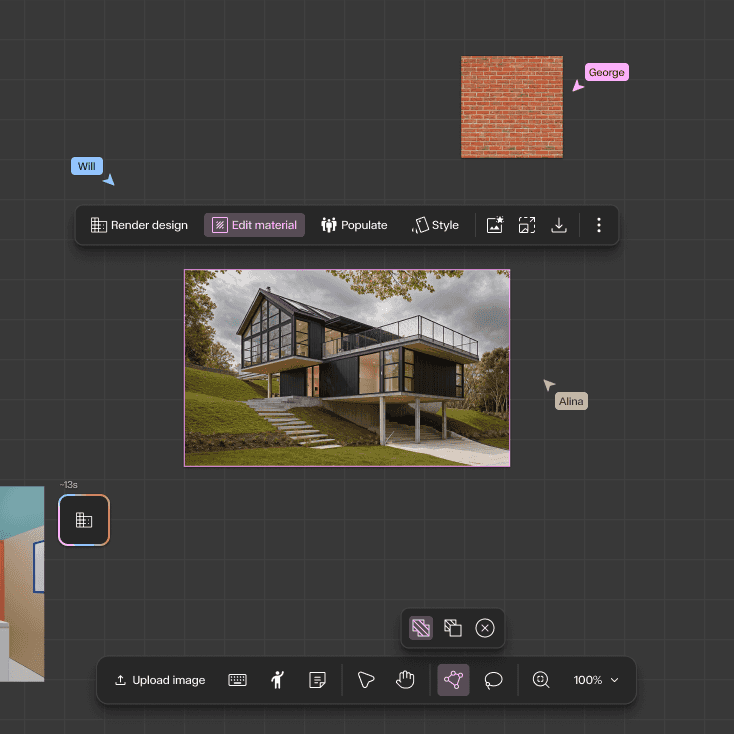
- Rapid design iteration: Gendo excels at generating multiple design variants almost instantly. Users can input a text prompt like 'modern office building with glass facade' and receive several distinct options. This accelerates the ideation phase dramatically, allowing architects to explore a wider range of concepts in a single sitting. For client presentations, this means showing diverse possibilities without spending days on manual modeling.
- Seamless export to standard tools: The ability to export generated designs to Revit, SketchUp, and Rhino formats is a game-changer for workflow integration. Instead of using AI as a standalone novelty, Gendo fits into existing architectural pipelines, allowing designers to take a generated concept and continue detailing it in their preferred software. This practical integration sets it apart from many AI image generators that output only flat images.
- Team collaboration on Professional plan: The Professional plan enables multiple users to work on the same project concurrently. This is crucial for architecture teams where several designers might need to input ideas or refine designs simultaneously. It encourages a collaborative brainstorming environment and ensures that all team members have access to the latest iterations, improving overall project coherence.
- Style transfer for existing models: Gendo's style transfer feature lets users apply different architectural styles to their existing 3D models. For example, a simple massing model can be transformed into a parametric, futuristic, or traditional design. This is a powerful tool for exploring aesthetic directions without remodeling from scratch, saving significant time during the design development phase.
- Web-based platform with no hardware demands: Since Gendo runs entirely in the cloud, users don't need a high-end GPU or specific operating system. This lowers the barrier to entry for small firms or independent architects who may not have access to powerful workstations. The accessibility means that anyone with an internet connection can start designing, making it a practical tool for freelance professionals.
⚠ Watch out for
- Starter plan limits projects to 5: For active professionals, having only 5 projects in the Starter plan is highly restrictive. Once those are filled, you cannot create new projects without deleting old ones, which is a major inconvenience. This forces users to either upgrade to a pricier plan or constantly manage their project queue, disrupting workflow. At $50/month, you'd expect more flexibility.
- No free tier or trial: There's no free trial or freemium version, which is a significant hurdle for potential adopters. In a market where many SaaS tools offer at least a 14-day free trial, Gendo's requirement for an upfront paid commitment is a tough sell. This is especially problematic for architects who are cautious about adopting new software and need to test its output quality before investing.
- Lacks API for automation and integration: The absence of an API is a major drawback for tech-savvy firms that rely on custom pipelines. Without an API, users cannot automate design generation, integrate Gendo into their existing project management tools, or build custom workflows. This limits its utility for larger organizations that value interoperability and automation.
- Output quality can be inconsistent: While Gendo generates impressive results, the output can sometimes be abstract or require significant post-editing to be practical. For instance, floor plans may lack precise dimensions and structural details, requiring manual corrections. This can be frustrating for users who need more reliable, accurate outputs, especially for preliminary design documentation.
- Limited control over detailed parameters: Users have limited control over specific design parameters such as exact dimensions, zoning constraints, or site conditions. The tool relies heavily on prompt engineering, which may not always capture nuanced requirements. This lack of fine-grained control could be a deal-breaker for architects who need to adhere to strict building codes or client specifications.
🎯 Best for
Architecture firms and individual designers who need fast, AI-driven concept generation and iteration for residential or commercial building projects.
🚫 Who should skip
Users who require extensive integrations, custom automation, or a free trial; also those needing on-the-go access via mobile devices.
📚 Learning curve
Moderate – using the AI effectively requires some experimentation with prompts and adjusting outputs, but the interface is straightforward.
🧑⚖️ Verdict
Gendo is a valuable tool for architects and designers seeking rapid conceptual exploration and iteration. Its integration with standard software and collaborative features make it a strong contender for firms embracing AI. However, the limited project count and lack of free trial or API may deter so
📊 Use Case Suitability
Higher score = better fit. Scores from editorial review.
🧭 Which One Should You Pick?
Choose AI Menu Photo if...
- You are: Restaurant owners, food bloggers, and social media managers who want to quickly and affordably improve food photos witho
- 👍 Eliminates the cost of professional food photography with AI-powered enhancements.
- 👍 Easy to use with a simple interface and mobile app available for on-the-go editing.
- 👍 API access allows integration into existing workflows, such as bulk menu image processing.
- 💰 From $15/mo
- ⚠ Trade-off: Limited to food photos only—not suitable for other types of image enhancement.
Choose Gendo if...
- You are: Architecture firms and individual designers who need fast, AI-driven concept generation and iteration for residential or
- 👍 Generates multiple design variants quickly, accelerating the ideation phase.
- 👍 Export formats allow easy integration into standard architectural workflows.
- 👍 Team collaboration in the Professional plan enables concurrent work on projects.
- 💰 From $50/mo
- ⚠ Trade-off: Starter plan is limited to only 5 projects, which may be restrictive for active
❓ Frequently Asked Questions
Can I use AI Menu Photo for free?
Yes, there is a free tier that includes AI model enhancements but with limited enhancements per month. For unlimited enhancements, you need the Pro plan at $15/month.
What export formats are supported?
The Pro plan includes additional export formats. The free tier may have limited export options, but the exact formats are not specified—contact support for details.
Is there a mobile app available?
Yes, AI Menu Photo has a mobile app, allowing you to enhance food photos directly from your smartphone.
Does AI Menu Photo offer an API?
Yes, an API is available, which is useful for integrating photo enhancements into your own applications or workflows.
🔗 More Ai Design Comparisons
🔀 Explore Alternatives
📧 Save this comparison
We'll email you a link to this comparison. No spam.