Gendo vs Style3D AI
Side-by-side comparison — pricing, features, ratings, use cases. Find which Ai Design fits you best.
💰 Pricing
🔧 Features
📋 Assessment
💪 Strengths
- Rapid design iteration: Gendo excels at generating multiple design variants almost instantly. Users can input a text prompt like 'modern office building with glass facade' and receive several distinct options. This accelerates the ideation phase dramatically, allowing architects to explore a wider range of concepts in a single sitting. For client presentations, this means showing diverse possibilities without spending days on manual modeling.
- Seamless export to standard tools: The ability to export generated designs to Revit, SketchUp, and Rhino formats is a game-changer for workflow integration. Instead of using AI as a standalone novelty, Gendo fits into existing architectural pipelines, allowing designers to take a generated concept and continue detailing it in their preferred software. This practical integration sets it apart from many AI image generators that output only flat images.
- Team collaboration on Professional plan: The Professional plan enables multiple users to work on the same project concurrently. This is crucial for architecture teams where several designers might need to input ideas or refine designs simultaneously. It encourages a collaborative brainstorming environment and ensures that all team members have access to the latest iterations, improving overall project coherence.
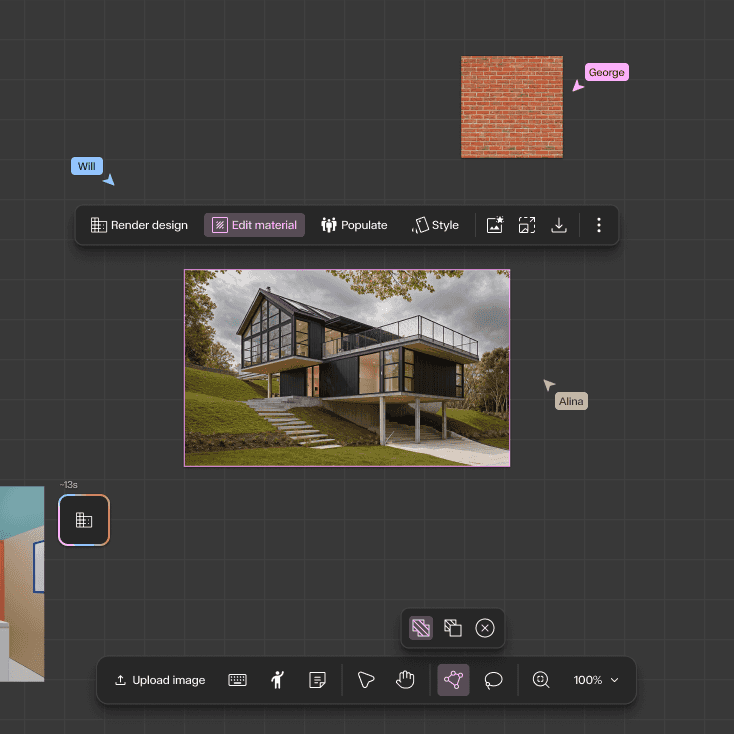
- Style transfer for existing models: Gendo's style transfer feature lets users apply different architectural styles to their existing 3D models. For example, a simple massing model can be transformed into a parametric, futuristic, or traditional design. This is a powerful tool for exploring aesthetic directions without remodeling from scratch, saving significant time during the design development phase.
- Web-based platform with no hardware demands: Since Gendo runs entirely in the cloud, users don't need a high-end GPU or specific operating system. This lowers the barrier to entry for small firms or independent architects who may not have access to powerful workstations. The accessibility means that anyone with an internet connection can start designing, making it a practical tool for freelance professionals.
⚠ Watch out for
- Starter plan limits projects to 5: For active professionals, having only 5 projects in the Starter plan is highly restrictive. Once those are filled, you cannot create new projects without deleting old ones, which is a major inconvenience. This forces users to either upgrade to a pricier plan or constantly manage their project queue, disrupting workflow. At $50/month, you'd expect more flexibility.
- No free tier or trial: There's no free trial or freemium version, which is a significant hurdle for potential adopters. In a market where many SaaS tools offer at least a 14-day free trial, Gendo's requirement for an upfront paid commitment is a tough sell. This is especially problematic for architects who are cautious about adopting new software and need to test its output quality before investing.
- Lacks API for automation and integration: The absence of an API is a major drawback for tech-savvy firms that rely on custom pipelines. Without an API, users cannot automate design generation, integrate Gendo into their existing project management tools, or build custom workflows. This limits its utility for larger organizations that value interoperability and automation.
- Output quality can be inconsistent: While Gendo generates impressive results, the output can sometimes be abstract or require significant post-editing to be practical. For instance, floor plans may lack precise dimensions and structural details, requiring manual corrections. This can be frustrating for users who need more reliable, accurate outputs, especially for preliminary design documentation.
- Limited control over detailed parameters: Users have limited control over specific design parameters such as exact dimensions, zoning constraints, or site conditions. The tool relies heavily on prompt engineering, which may not always capture nuanced requirements. This lack of fine-grained control could be a deal-breaker for architects who need to adhere to strict building codes or client specifications.
🎯 Best for
Architecture firms and individual designers who need fast, AI-driven concept generation and iteration for residential or commercial building projects.
🚫 Who should skip
Users who require extensive integrations, custom automation, or a free trial; also those needing on-the-go access via mobile devices.
📚 Learning curve
Moderate – using the AI effectively requires some experimentation with prompts and adjusting outputs, but the interface is straightforward.
🧑⚖️ Verdict
Gendo is a valuable tool for architects and designers seeking rapid conceptual exploration and iteration. Its integration with standard software and collaborative features make it a strong contender for firms embracing AI. However, the limited project count and lack of free trial or API may deter so
💰 Pricing
🔧 Features
📋 Assessment
💪 Strengths
- The realistic 3D garment simulation is the standout feature. Style3D AI accurately models fabric physics, including draping, elasticity, and stiffness, which means designers can evaluate the fall of a silk dress or the stretch of a denim jacket without a physical sample. This dramatically reduces the number of prototypes needed, cutting costs and speeding up the design cycle. For a fashion brand that produces hundreds of styles per season, this efficiency is transformative.
- Team collaboration capabilities are robust. Real-time co-editing allows multiple designers to work on the same garment simultaneously, and the shared asset library ensures that everyone uses the same fabrics, trims, and colors. This eliminates version control issues and streamlines communication, making it especially valuable for remote teams spread across different time zones. The collaboration feels seamless, as if everyone is in the same room.
- API access on Pro and Enterprise plans is a major plus for integration. This allows brands to connect Style3D AI with their existing PLM, ERP, or e-commerce systems, creating a smooth data flow from design to production. For example, a digital sample can be automatically pushed to a product catalog or a supplier, reducing manual data entry and errors. This makes the platform not just a design tool but a bridge to the entire product lifecycle.
- The platform includes a library of customizable templates and digital materials. Users can start with pre-built garment templates and adjust them, which accelerates onboarding and speeds up the design process. The material library offers a wide range of fabric types, textures, and colors, allowing designers to experiment without physical sourcing. This is a time-saver for quick iterations and client presentations.
- The ability to do virtual try-ons on 3D avatars is another strong point. Designers can see how a garment fits on various body shapes and sizes, which helps in sizing and fit communication. This is crucial for pattern grading and can reduce fit issues later in production. The avatars are customizable, making it easier to visualize target consumers.
⚠ Watch out for
- The learning curve is moderate to steep, particularly for designers accustomed to traditional 2D pattern-making or basic 3D tools. The software has many features and a complex interface that can be overwhelming initially. New users will need to invest time in tutorials and training to become efficient. While there is a knowledge base, hands-on practice is essential, and this might slow down teams with tight deadlines.
- A significant drawback is the lack of a mobile app or browser extension. This means designers and stakeholders cannot review designs or provide feedback on the go. In a fast-paced industry, the ability to quickly check a design from a phone or tablet is a practical necessity. The absence of this flexibility could hinder fast decision-making and collaboration, especially for teams working across different locations.
- Security compliance is a concern. Style3D AI is not GDPR or SOC2 compliant, which is a red flag for companies that handle sensitive customer data or operate in regulated markets. For enterprises with strict data privacy requirements, this alone could disqualify the tool. Even smaller brands might worry about the safety of their proprietary designs and customer information.
- While the collaboration features are strong, they require an internet connection and are not designed for offline work. This is a limitation for designers who travel or work in areas with unreliable connectivity. The platform is heavily cloud-dependent, and any downtime or latency can disrupt the design process. There's no offline mode for critical reviews.
- The pricing, though starting at $50/month per user, can become costly for larger teams. The features you need, like API access and advanced collaboration, are only available on higher tiers (Pro and Enterprise), which are likely priced significantly higher. For a small studio with a handful of designers, the starting plan might be sufficient, but for a full team, the cost adds up quickly compared to a one-time software license.
🎯 Best for
Fashion designers, brands, and retailers looking to digitize their garment design and sampling process through realistic 3D modeling and team collaboration.
🚫 Who should skip
Teams that require a mobile app for design review on the go, or organizations that must adhere to strict GDPR/SOC2 compliance, may need to look elsewhere.
📚 Learning curve
Moderate — users need basic familiarity with 3D modeling concepts and garment physics; initial onboarding time is required to master the tool's simulation and workflow features.
🧑⚖️ Verdict
Style3D AI is a powerful tool for fashion designers and brands that want to reduce physical sampling and enhance collaboration. It is especially suited for small to mid-sized teams that value realistic simulation and are willing to invest in training. However, if you require mobile access, strict da
📊 Use Case Suitability
Higher score = better fit. Scores from editorial review.
🧭 Which One Should You Pick?
Choose Gendo if...
- You are: Architecture firms and individual designers who need fast, AI-driven concept generation and iteration for residential or
- 👍 Generates multiple design variants quickly, accelerating the ideation phase.
- 👍 Export formats allow easy integration into standard architectural workflows.
- 👍 Team collaboration in the Professional plan enables concurrent work on projects.
- 💰 From $50/mo
- ⚠ Trade-off: Starter plan is limited to only 5 projects, which may be restrictive for active
Choose Style3D AI if...
- You are: Fashion designers, brands, and retailers looking to digitize their garment design and sampling process through realistic
- 👍 Realistic 3D garment simulation that closely mimics fabric physics and draping, reducing the need fo
- 👍 Team collaboration features enable real-time co-editing and asset sharing, enhancing workflow effici
- 👍 API access on Pro and Enterprise plans allows integration with existing PLM, ERP, or e-commerce syst
- 💰 From $50/mo
- ⚠ Trade-off: No mobile app or browser extension available, limiting flexibility for on-the-go
❓ Frequently Asked Questions
What are the main differences between the Starter and Professional plans?
The Starter plan costs $50 per month and includes access to the AI model and export formats, but limits you to 5 projects. The Professional plan at $150 per month adds team collaboration and removes project limits, allowing unlimited projects.
Does Gendo offer a free trial or any free tier?
No, Gendo does not offer a free tier or free trial. You must choose a paid plan to access the tool.
Are there any hidden costs like usage-based fees?
No usage-based fees are mentioned; the pricing is fixed monthly. However, the Starter plan's 5-project limit may require upgrading to Professional if you need more projects.
🔗 More Ai Design Comparisons
🔀 Explore Alternatives
📧 Save this comparison
We'll email you a link to this comparison. No spam.