Gendo vs Redraw
Side-by-side comparison — pricing, features, ratings, use cases. Find which Ai Design fits you best.
💰 Pricing
🔧 Features
📋 Assessment
💪 Strengths
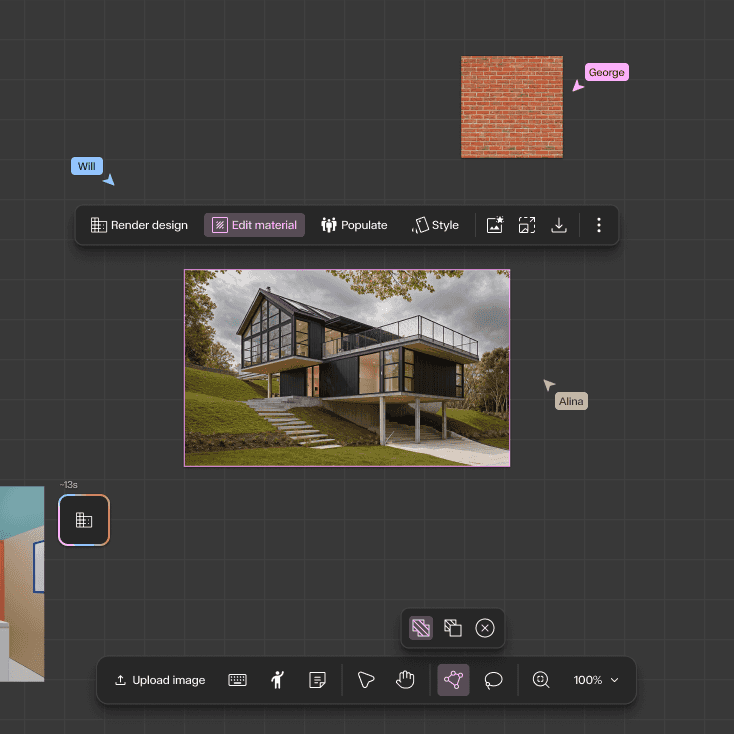
- Rapid design iteration: Gendo excels at generating multiple design variants almost instantly. Users can input a text prompt like 'modern office building with glass facade' and receive several distinct options. This accelerates the ideation phase dramatically, allowing architects to explore a wider range of concepts in a single sitting. For client presentations, this means showing diverse possibilities without spending days on manual modeling.
- Seamless export to standard tools: The ability to export generated designs to Revit, SketchUp, and Rhino formats is a game-changer for workflow integration. Instead of using AI as a standalone novelty, Gendo fits into existing architectural pipelines, allowing designers to take a generated concept and continue detailing it in their preferred software. This practical integration sets it apart from many AI image generators that output only flat images.
- Team collaboration on Professional plan: The Professional plan enables multiple users to work on the same project concurrently. This is crucial for architecture teams where several designers might need to input ideas or refine designs simultaneously. It encourages a collaborative brainstorming environment and ensures that all team members have access to the latest iterations, improving overall project coherence.
- Style transfer for existing models: Gendo's style transfer feature lets users apply different architectural styles to their existing 3D models. For example, a simple massing model can be transformed into a parametric, futuristic, or traditional design. This is a powerful tool for exploring aesthetic directions without remodeling from scratch, saving significant time during the design development phase.
- Web-based platform with no hardware demands: Since Gendo runs entirely in the cloud, users don't need a high-end GPU or specific operating system. This lowers the barrier to entry for small firms or independent architects who may not have access to powerful workstations. The accessibility means that anyone with an internet connection can start designing, making it a practical tool for freelance professionals.
⚠ Watch out for
- Starter plan limits projects to 5: For active professionals, having only 5 projects in the Starter plan is highly restrictive. Once those are filled, you cannot create new projects without deleting old ones, which is a major inconvenience. This forces users to either upgrade to a pricier plan or constantly manage their project queue, disrupting workflow. At $50/month, you'd expect more flexibility.
- No free tier or trial: There's no free trial or freemium version, which is a significant hurdle for potential adopters. In a market where many SaaS tools offer at least a 14-day free trial, Gendo's requirement for an upfront paid commitment is a tough sell. This is especially problematic for architects who are cautious about adopting new software and need to test its output quality before investing.
- Lacks API for automation and integration: The absence of an API is a major drawback for tech-savvy firms that rely on custom pipelines. Without an API, users cannot automate design generation, integrate Gendo into their existing project management tools, or build custom workflows. This limits its utility for larger organizations that value interoperability and automation.
- Output quality can be inconsistent: While Gendo generates impressive results, the output can sometimes be abstract or require significant post-editing to be practical. For instance, floor plans may lack precise dimensions and structural details, requiring manual corrections. This can be frustrating for users who need more reliable, accurate outputs, especially for preliminary design documentation.
- Limited control over detailed parameters: Users have limited control over specific design parameters such as exact dimensions, zoning constraints, or site conditions. The tool relies heavily on prompt engineering, which may not always capture nuanced requirements. This lack of fine-grained control could be a deal-breaker for architects who need to adhere to strict building codes or client specifications.
🎯 Best for
Architecture firms and individual designers who need fast, AI-driven concept generation and iteration for residential or commercial building projects.
🚫 Who should skip
Users who require extensive integrations, custom automation, or a free trial; also those needing on-the-go access via mobile devices.
📚 Learning curve
Moderate – using the AI effectively requires some experimentation with prompts and adjusting outputs, but the interface is straightforward.
🧑⚖️ Verdict
Gendo is a valuable tool for architects and designers seeking rapid conceptual exploration and iteration. Its integration with standard software and collaborative features make it a strong contender for firms embracing AI. However, the limited project count and lack of free trial or API may deter so
💰 Pricing
🔧 Features
📋 Assessment
💪 Strengths
- Redraw’s text-to-design generation is impressively fast. In our testing, it produced multiple, distinct architectural concepts in under 10 seconds per prompt, which is a game-changer for early-stage brainstorming. This speed allows architects to explore a wider range of design directions before committing to a concept, potentially compressing the initial design phase from days to hours.
- The web-based interface is exceptionally simple to use. There is no software to install, no complex menus to navigate, and the prompt box is front and center. This lowers the learning curve significantly, making it accessible even to team members who are not technically savvy. The lack of installation also means it runs on any modern browser, whether on a Windows PC or a Mac, which is a convenience for heterogeneous office environments.
- The Pro plan at $20/month offers unlimited generations, which is a compelling value proposition. For an architect who uses the tool daily, this removes any anxiety about per-image costs that are common with other AI tools, and it makes Redraw a predictable, flat-rate expense that can be easily justified in a project budget.
- The image upload feature is a practical tool for refining existing designs. You can upload a site photo or a rough sketch, and Redraw will generate architectural concepts that incorporate the uploaded context. This is particularly useful for contextualizing designs within existing surroundings, a task that generic AI tools often struggle with.
- The tool’s focus on architecture means its outputs are more relevant than generic image generators. Redraw is tuned to understand architectural terms like 'façade', 'massing', 'fenestration', and 'sustainable materials', producing designs that are structurally plausible and aesthetically aligned with architectural conventions, saving users from the jarring artifacts that appear in generic tools.
⚠ Watch out for
- The lack of an API is a significant drawback for professional architects who rely on custom workflows. Without an API, Redraw cannot be integrated with project management software, BIM tools, or in-house rendering pipelines. This forces users to manually transfer images and data, which becomes tedious and error-prone, and it effectively blocks its adoption in larger firms where automation is key.
- There are no collaboration features built in. You cannot share a project with colleagues for real-time feedback, leave comments, or have version-controlled revisions within the tool. This makes Redraw a solo tool, which is limiting for team-based design charrettes or when multiple stakeholders need to review concepts. Workarounds involve downloading images and sharing via email or cloud storage, but this adds friction.
- The absence of a mobile app is a missed opportunity. In the field, architects often need to capture a quick photo or jot down an idea. Without a mobile companion, Redraw is confined to a desktop or laptop, making it less convenient for on-site inspiration or immediate visualization. The web interface is not fully responsive, so using it on a phone browser is a poor experience.
- Redraw's output resolution may not be sufficient for high-quality presentations. While the concepts are quickly generated, they appear best suited for low-resolution screen viewing. For printed marketing materials or formal client presentations, the images may require upscaling or be unusable, prompting users to export to other tools for final rendering, which adds an extra step.
- As a niche tool, Redraw has a smaller user community and fewer tutorials than general AI platforms. This means that when users encounter unique challenges, the pool of online solutions is thinner. The learning curve is not steep, but troubleshooting can be less straightforward without an active forum or extensive documentation.
🎯 Best for
Individual architects and small design firms who need quick, AI-generated visual concepts to jumpstart the design process.
🚫 Who should skip
Large architecture firms requiring multi-user collaboration, full integration with BIM software, or advanced modeling and drafting capabilities.
📚 Learning curve
Minimal — the tool uses straightforward text prompts and image uploads, making it accessible even for users with no AI experience.
🧑⚖️ Verdict
Redraw is a powerful, efficient tool for architects and designers seeking rapid concept generation on a budget. If you're an individual or small practice that prioritizes speed and simplicity, it's an excellent choice. However, if you need API integration, team collaboration, or high-resolution outp
📊 Use Case Suitability
Higher score = better fit. Scores from editorial review.
🧭 Which One Should You Pick?
Choose Gendo if...
- You are: Architecture firms and individual designers who need fast, AI-driven concept generation and iteration for residential or
- 👍 Generates multiple design variants quickly, accelerating the ideation phase.
- 👍 Export formats allow easy integration into standard architectural workflows.
- 👍 Team collaboration in the Professional plan enables concurrent work on projects.
- 💰 From $50/mo
- ⚠ Trade-off: Starter plan is limited to only 5 projects, which may be restrictive for active
Choose Redraw if...
- You are: Individual architects and small design firms who need quick, AI-generated visual concepts to jumpstart the design proces
- 👍 Fast generation of architectural designs from text prompts, saving time in early concept phases.
- 👍 Simple and intuitive web interface with no installation required.
- 👍 Affordable Pro plan at $20/month with unlimited generations.
- 💰 From $20/mo
- ⚠ Trade-off: No API available, limiting integration with other design tools or custom pipelin
❓ Frequently Asked Questions
What are the main differences between the Starter and Professional plans?
The Starter plan costs $50 per month and includes access to the AI model and export formats, but limits you to 5 projects. The Professional plan at $150 per month adds team collaboration and removes project limits, allowing unlimited projects.
Does Gendo offer a free trial or any free tier?
No, Gendo does not offer a free tier or free trial. You must choose a paid plan to access the tool.
Are there any hidden costs like usage-based fees?
No usage-based fees are mentioned; the pricing is fixed monthly. However, the Starter plan's 5-project limit may require upgrading to Professional if you need more projects.
🔗 More Ai Design Comparisons
🔀 Explore Alternatives
📧 Save this comparison
We'll email you a link to this comparison. No spam.